Last month NAHAD launched an updated, enhanced membership portal to offer a more intuitive and improved user experience. If you haven’t already, follow the steps below to access the new portal.
Next Steps:
1. Access the new portal using this link.
2. Login or create a new account in the upgraded system.
3. Update your profile and preferences.
4. Explore the new features design to enhance your experience!
If You Have an Existing Account
1. Visit the Member Portal.
2. Select “Click here to reset your password.”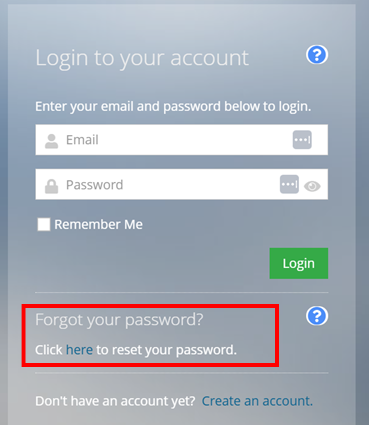
3. Use the email address associated with your account. This will send a link to create a new password.
4. Follow the reset password link in that email, update your password, and access the new portal.
Creating an Account
1. Visit the Member Portal.
2. Select “Create an account”.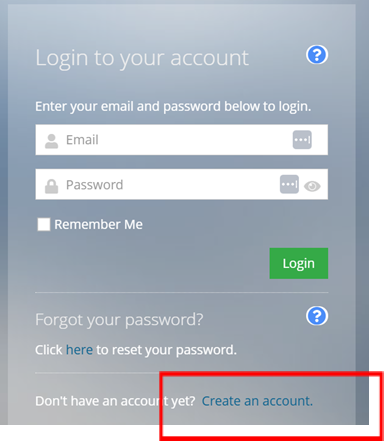
3. On the “Create an account” page, enter your information using your work email. The system will notify you if there is already an account associated with that email. If you have an existing account, see the instructions above.
4. Create a password (minimum of 16 characters, at least one upper-case letter, one numeric character, and on non-alphanumeric character)
5. Select “Continue” to see your profile page. Update any information or navigate using the menu to purchase memberships, register for events, or access materials.
*Note: Click on “Account” to update your demographic information.*
For your convenience, this guide can also be found under the “Login Help” page. If you have any questions or need assistance accessing your account, please contact our team at [email protected].